
Skip to content

Archived Returns

Archived Returns are completed return orders that have been processed and moved to historical records. Once a return is fully completed (items received, inspected, and finalized), it can be archived to keep your active returns list clean while maintaining a complete history of all returns.

Archived returns provide a permanent record for audits, customer service inquiries, and historical reporting without cluttering your active workflow.

Clean Active Lists

Keep your active returns view focused on items that need attention by moving completed returns to archive.

Complete History

Maintain a permanent record of all return transactions for auditing and compliance.

Customer Service

Quickly look up past returns when customers have questions about previous transactions.

Performance Reports

Analyze historical return data to identify trends, problem products, or seasonal patterns.


Returns are archived automatically or manually once they reach a completed status:

When a return reaches these completion statuses, it becomes eligible for archiving:

Active StatusDescriptionArchived StatusArchived Description
AS EXPECTED (25)All items received as seller expected28AS EXPECTED ARCHIVED
DISCREPANCY (26)Quantity or condition differences found29DISCREPANCY ARCHIVED
INCOMPLETE (27)Some expected items not received30INCOMPLETE ARCHIVED
UNEXPECTED (37)Received unexpected SKUs38UNEXPECTED ARCHIVED

System administrators can archive returns:

  • When closing an account (all completed returns are archived automatically)
  • Using the archivedrestocking() function for specific returns
  • Through bulk archiving operations during cleanup

  1. Access the Archived Returns View

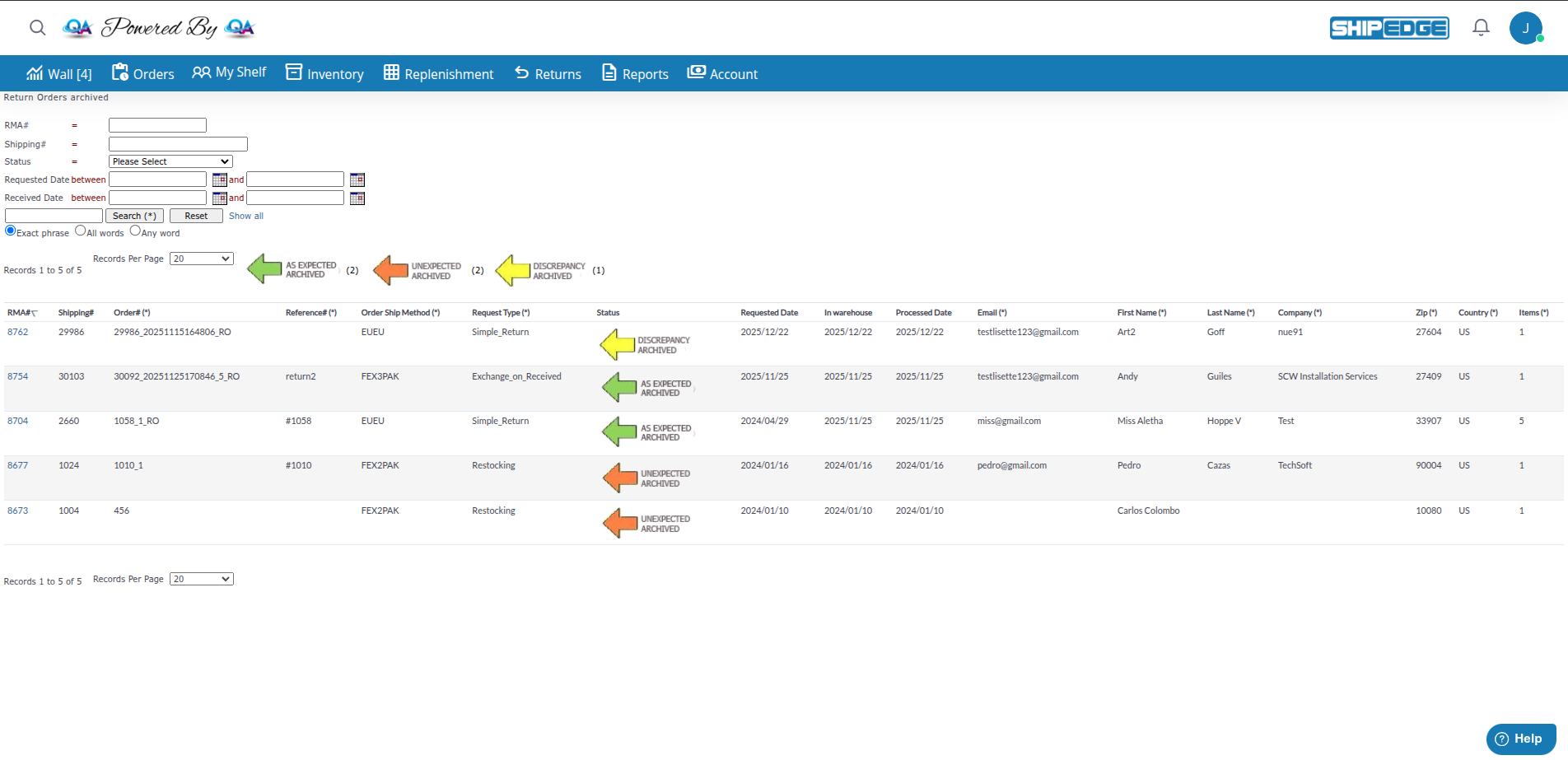
    Navigate to /return_archivedlist.php from your Returns menu or click “Return Orders Archived” from the active returns list.

  2. View the Archived Returns List

    You’ll see a table displaying all archived returns for your account with these columns:

    • RMA#: The return merchandise authorization number
    • Shipping#: Original order shipping number
    • Order#: Original customer order number
    • Reference#: Customer reference or PO number
    • Order Ship Method: Shipping method used for original order
    • Request Type: Type of return (Simple_Return, Exchange_on_Received, etc.)
    • Status: The archived status (AS EXPECTED ARCHIVED, DISCREPANCY ARCHIVED, etc.)
    • Requested Date: When the return was initiated
    • In warehouse: When the return was received at the warehouse
    • Processed Date: When the warehouse completed processing
    • Email: Customer email address
    • First Name / Last Name: Customer name
  3. Use Search Filters

    Find specific archived returns using these search fields:

    • RMA#: Search by return ID
    • Shipping#: Search by original order shipping number
    • Status: Filter by archived status type
    • Requested Date: Filter by date range when the return was initiated
    • Received Date: Filter by date range when warehouse received it
    • Processed Date: Filter by date range when warehouse completed it
    • Basic Search: Search across multiple fields (Order#, Reference#, Email, Name)
  4. View Return Details

    Click on any RMA# to view the complete return details including:

    • Original items ordered
    • Items returned by the customer
    • Items actually received by the warehouse (QtyGood, QtyHurt)
    • Comments from seller and warehouse
    • Linked exchange order (if applicable)
  5. Sort and Filter Results

    • Click column headers to sort ascending/descending
    • Use “Records Per Page” dropdown to show 10, 20, 50, 100, 200, or 500 records
    • Click “Show all” to clear all filters

Perfect Match

Return was completed exactly as the customer described with no issues.
What it means:

  • All expected items were received
  • Item conditions matched seller’s specifications
  • Quantities were correct
  • No discrepancies or unexpected items

Best For: Standard returns where everything went smoothly.


Differences Found

Return was completed but with differences between expected and actual items.

What it means:

  • Received quantities differed from what seller expected
  • Item conditions (Good vs. Hurt) didn’t match specifications
  • Different SKUs than expected
  • Items in worse or better condition than described

Common Causes:

  • Customer returned wrong quantity
  • Item condition was different than customer claimed
  • Customer added or substituted items
  • Counting errors

Action Required: Review discrepancy details. May need to contact customer about differences.


Missing Items

Return was completed but not all expected items were received.

What it means:

  • Customer shipped fewer items than declared
  • Some items lost in shipping
  • Only partial return received
  • Customer kept some items

Common Causes:

  • Customer changed mind about some items
  • Items damaged in transit and not delivered
  • Customer error in packing
  • Shipping carrier lost portion of the shipment

Action Required: Review which items are missing. May need to follow up with customer or carrier.


Surprise Items

Return included items that weren’t part of the original return request.

What it means:

  • Received SKUs not in the return authorization
  • Items from different orders mixed in
  • Extra items customer didn’t declare
  • Wrong order returned entirely

Common Causes:

  • Customer returned wrong order
  • Customer added unrequested items
  • Multiple returns mixed together
  • Shipping error delivered wrong package

Action Required: Determine ownership of unexpected items. May need to create new return or contact customer.


URL: /return_archivedlist.php

Shows: Only your account’s archived returns (filtered by AcountID)

Statuses Visible: 28, 29, 30, 38

Purpose: View your historical returns for reference, customer service, and reporting.


URL: /return_archived_whlist.php

Shows: All archived returns across all accounts

Statuses Visible: 25, 26, 27, 28, 29, 30, 37, 38 (both active completed and archived)

Purpose: Warehouse team can see all completed returns for processing history and audit purposes.


Scenario 1: Customer Calls About Past Return

Section titled “Scenario 1: Customer Calls About Past Return”

Situation: Customer calls asking about a return from 3 months ago.

Process:

  1. Go to Archived Returns
  2. Search by customer Email or Order#
  3. Find the RMA# and click to view details
  4. Review what was returned and when it was processed
  5. Provide customer with status and outcome

Situation: You want to see which products have the most returns.

Process:

  1. Go to Archived Returns
  2. Filter by Requested Date (e.g., last 6 months)
  3. Review the returns list
  4. Export data to CSV for deeper analysis
  5. Identify problem SKUs or patterns

Situation: Accounting needs to verify return transactions for a specific period.

Process:

  1. Go to Archived Returns
  2. Filter by Processed Date for the audit period
  3. Sort by Status to group by completion type
  4. Export the full list with all details
  5. Provide to accounting with original order records

Situation: You need to verify if a replacement was sent for a return.

Process:

  1. Go to Archived Returns
  2. Search for the original RMA#
  3. View the return details
  4. Look for the “View exchange” link
  5. Click to see the replacement order status

Regular Review

Periodically review archived returns to ensure accuracy and complete any outstanding follow-ups before final archiving.

Clear Documentation

Add detailed comments to returns before archiving so future reference is clear and complete.

Resolve Discrepancies

Contact customers about discrepancies before archiving so issues are resolved, not just recorded.

Link Related Orders

Ensure exchanges are properly linked to returns before archiving for complete audit trails.

Export for Records

Periodically export archived returns to external storage for long-term backup beyond the system.

Analyze Patterns

Review archived returns quarterly to identify recurring issues, problem products, or process improvements.


Can't Find an Old Return

Cause: Return might still be in active view or search filters are too narrow.

Solution:

  • Check the active Returns list first (may not be archived yet)
  • Clear all search filters and click “Show all”
  • Try searching by multiple fields (RMA#, Order#, Email)
  • Expand date range filters to include the full time period
  • Check if you have permission to view archived returns

Return Shows Wrong Status

Cause: Return status may have been updated after archiving or during account closure.

Solution:

  • Verify the status in the return details view
  • Check if the return was modified after archiving
  • Contact system administrator if status appears incorrect
  • Review related exchange orders for additional context

Missing Return Data

Cause: Return may have been created before certain fields were added or data was incomplete.

Solution:

  • Check the original return details for what data was captured
  • Review any linked orders for additional information
  • Contact customer if critical information is needed
  • Note missing data in comments for future reference

Cannot Export Archived Returns

Cause: Permission issue or too many records selected.

Solution:

  • Check that you have export permissions
  • Try exporting smaller date ranges
  • Use filters to reduce the number of records
  • Contact administrator if export functionality is disabled

Archived returns provide valuable data for:

Track return rates by:

  • Product category or SKU
  • Time period (seasonal trends)
  • Customer segment
  • Order value range

Monitor:

  • Percentage of returns with discrepancies
  • Incomplete return rates
  • Unexpected item frequency
  • Time from request to completion

Identify:

  • High-return customers
  • Common return reasons
  • Geographic return patterns
  • Repeat issues

Measure:

  • Processing time (In warehouse → Processed Date)
  • Accuracy rate (AS EXPECTED vs. DISCREPANCY)
  • Incomplete return frequency
  • Average items per return

FieldTypeDescription
OrderStatusINTReturn status: 28, 29, 30, 38 (archived states)
OrderDateDATETIMEWhen the return was originally requested
Process_dateDATETIMEWhen warehouse received the return
WHProcessDateDATETIMEWhen warehouse completed processing the return
Request_TypeVARCHARType of return (Simple_Return, Exchange_on_Received, etc.)
AcountIDINTSeller/customer account ID
OrderIDINTOriginal shipping number
IDINTRMA number (unique return identifier)

archivedrestocking($rma_id): Archives a completed return by updating its status:

  • Status 25 → 28 (AS EXPECTED → ARCHIVED)
  • Status 26 → 29 (DISCREPANCY → ARCHIVED)
  • Status 27 → 30 (INCOMPLETE → ARCHIVED)
  • Status 37 → 38 (UNEXPECTED → ARCHIVED)
return_order.AcountID = '$_SESSION[CurrentAcountID]'
AND (return_order.OrderStatus = 28
OR return_order.OrderStatus = 29
OR return_order.OrderStatus = 30
OR return_order.OrderStatus = 38)
return_order.OrderStatus = 25
OR return_order.OrderStatus = 26
OR return_order.OrderStatus = 27
OR return_order.OrderStatus = 28
OR return_order.OrderStatus = 29
OR return_order.OrderStatus = 30
OR return_order.OrderStatus = 37
OR return_order.OrderStatus = 38


Next Steps: Archived returns are permanent records. Export data periodically for external backup, and use the archived returns list to analyze trends and improve your return processes.