
Automate Inventory Operations
Perform inventory recounts and corrections programmatically without manual warehouse operations.
The REST API v4 (WMS) allows you to programmatically manage warehouse operations in your ShipEdge Warehouse Management System. This API provides endpoints for inventory recounts, order weight updates, shipment management, and bin information retrieval.
Perform inventory recounts and corrections programmatically without manual warehouse operations.
Update order weights automatically after weighing packages, integrating with scale systems.
Revert shipments to pending status when corrections are needed before shipping.
Retrieve detailed bin information for products to support warehouse operations and reporting.
All WMS API endpoints use this base URL:
https://your-instance.shipedge.com/apirest/v4/wms/Replace your-instance.shipedge.com with your actual ShipEdge instance URL.
REST API v4 (WMS) requires authentication via HTTP headers in every request.
userName: [Your warehouse username]Key: [Your master API key]Log in to your ShipEdge WMS account
Access your Warehouse Management System account through the web interface.
Navigate to System Config
Go to System Config in the main menu.
Open Preferences
Click on Preferences in the System Config menu.
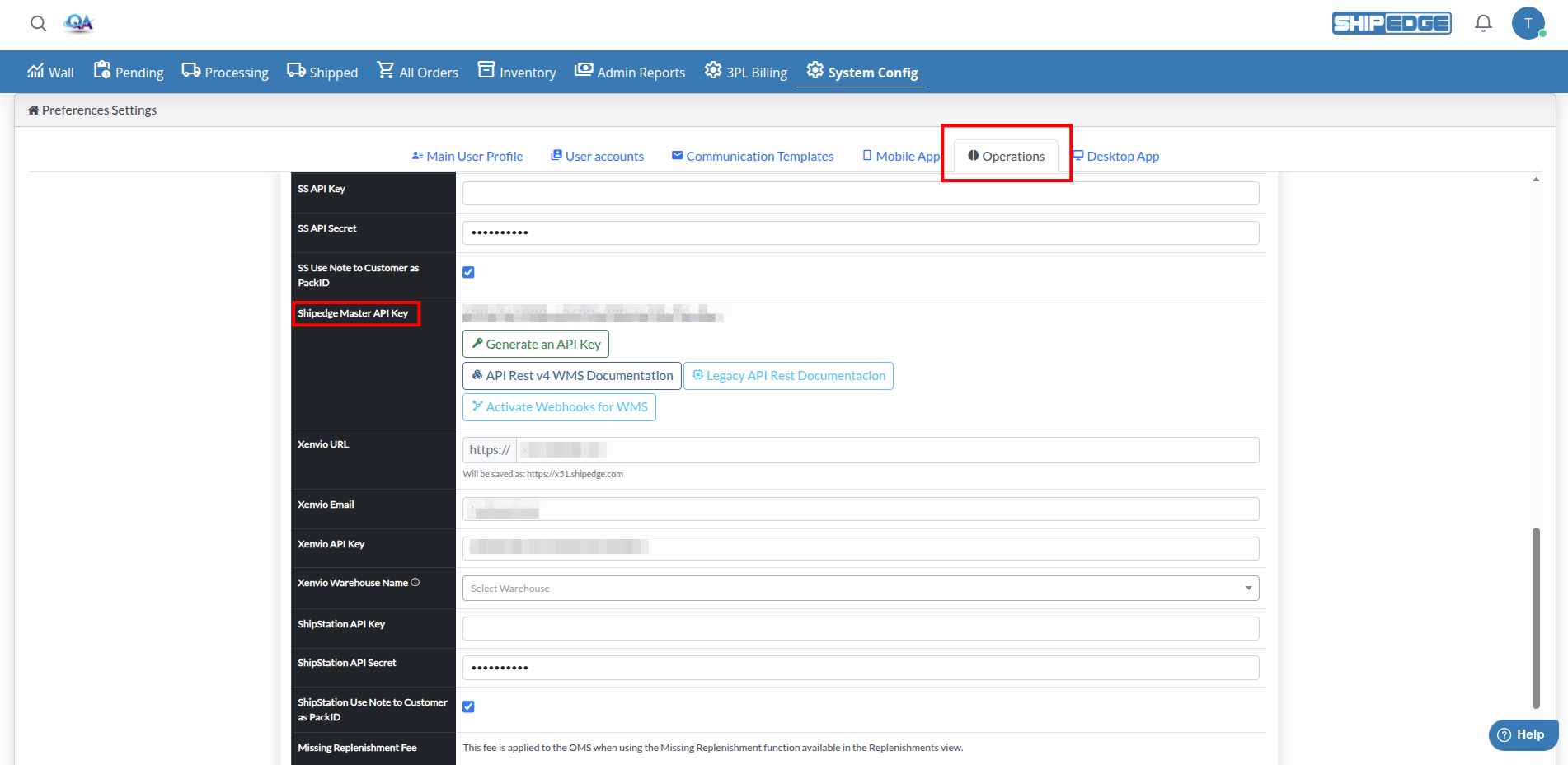
Go to Operations section
Navigate to the Operations tab or section.
Find Master API Key
Look for Shipedge master API Key field. If no key exists, click Generate an API Key to create one.
Get your Username
Your username is the same username you use to log in to the WMS system.
curl -X POST https://your-instance.shipedge.com/apirest/v4/wms/ping \ -H "userName: manager" \ -H "Key: abcde12345"Successful API responses follow this structure:
{ "data": { // Response data here }}Example - Ping endpoint:
{ "data": { "status": "Successful", "result": "pong!" }}Error responses include details about what went wrong:
{ "response": { "success": false, "message": "Error description here" }}200 - Success400 - Invalid request (missing or incorrect parameters)401 - Unauthorized (invalid credentials, user not activated, or insufficient permissions)403 - Forbidden (no permissions)404 - Not found (resource doesn’t exist)500 - Server errorCheck system status and verify your authentication.
Endpoint: POST /ping
Headers: userName, Key
Response:
{ "data": { "status": "Successful", "result": "pong!" }}Update the weight of an order after weighing the package. This endpoint is typically used when integrating with scale systems or after manual weighing.
Endpoint: POST /orders/UpdateWeight
Headers: userName, Key
Body:
{ "data": [ { "nbtybarcode": "abc123", "weight": 1.5 } ]}Required Fields:
nbtybarcode - Unique barcode or identifier for the order/packageweight - Weight value as a float (e.g., 1.5 for 1.5 lbs)Order Status Requirements:
Response:
{ "response": { "success": true, "message": "Order is being updating" }}Common Errors:
400 - Missing required fields (nbtybarcode or weight)400 - Invalid weight format (must be numeric)400 - Order not found or not in correct status400 - Order status doesn’t allow weight updatesUse Cases:
Retrieve detailed bin information for a specific product, including all locations and bins where the product is stored.
Endpoint: GET /inventory/products/{product_id}/bin
Headers: userName, Key
Path Parameters:
product_id - Product ID (numeric)Example:
GET /apirest/v4/wms/inventory/products/12345/binResponse:
{ "bin_list": [ { "BinID": 1, "Location": "A-01", "Bin": "BIN-001", "Quantity": 50, "ProductID": 12345 } ]}Use Cases:
Create and process inventory recounts to adjust bin quantities. This endpoint allows you to increase or decrease inventory levels in specific bins.
Endpoint: POST /recount
Headers: userName, Key
Body:
[ { "account_id": 222, "comment": "Monthly inventory adjustment", "skus": [ { "sku": "SKU_1", "bins": [ { "location": "A-01", "bin": "BIN_1", "qty": 10 }, { "location": "A-01", "bin": "BIN_2", "qty": -5 } ] }, { "sku": "SKU_2", "bins": [ { "location": "B-02", "bin": "BIN_3", "qty_in_bin": 100 } ] } ] }]Required Fields:
account_id - OMS account ID (numeric, must be activated)skus - Array of SKUs to recountskus[].sku - SKU identifier (must exist in system)skus[].bins - Array of bins for this SKUskus[].bins[].location - Location name (alphanumeric)skus[].bins[].bin - Bin name (alphanumeric)skus[].bins[].qty OR skus[].bins[].qty_in_bin - Quantity adjustmentQuantity Options:
qty: Relative adjustment (adds or subtracts from current quantity)
10 adds 10 units)-5 subtracts 5 units)qty_in_bin: Absolute value (sets the exact quantity in the bin)
Optional Fields:
comment - Notes about the recount transaction (default: “Updated using the Recount API.”)Response:
{ "success": true, "message": "Success: {correction_account_id: 222, skus:SKU_1, correction_id: 12345}", "result": [ { "account_id": 222, "sku": "SKU_1", "bin": "BIN_1", "location": "A-01", "correction_id": 12345, "error": false, "new_quantity": 60, "description": "Recount processed successfully" } ], "code": 200}Error Response:
{ "success": false, "message": "Unsuccess: {no_create_recount_account_id: 222, skus:SKU_1}", "result": [ { "account_id": 222, "sku": "SKU_1", "bin": "BIN_1", "location": "A-01", "error": true, "message": "Error description", "procces_correction": false } ], "code": 400}Common Errors:
400 - Missing required fields (account_id, skus, sku, bins, location, bin)400 - Account not found or not activated400 - SKU doesn’t exist400 - Location or bin doesn’t exist400 - Invalid quantity format400 - Both qty and qty_in_bin provided (use only one)Use Cases:
Important Notes:
correction_id in the response to track the recountqty for adjustments, qty_in_bin for absolute quantitiesRevert one or more shipments from Processing status back to Pending status. This is useful when corrections are needed before shipping.
Endpoint: POST /shipments/revert/pending
Headers: userName, Key
Body:
{ "shipments_list": [262742, 263003]}Required Fields:
shipments_list - Array of shipment IDs (order IDs) to revertRequirements:
Response:
{ "response": { "success": true, "message": "Your request had been accepted, will be processed soon." }}Error Response:
{ "response": { "success": false, "message": "The shipments 262742, 263003 are not in processing status." }}Common Errors:
400 - Missing shipments_list field400 - Empty shipments list400 - Shipments don’t exist in warehouse400 - Shipments are not in Processing status (must be status 4)Use Cases:
Important Notes:
Always test your authentication using the /ping endpoint before making more complex requests.
Verify that orders exist and are in the correct status before updating weights or reverting shipments.
Use qty for relative adjustments and qty_in_bin for absolute quantities. Don’t use both in the same request.
Always check HTTP status codes and handle errors appropriately. Review error messages for specific issues.
Never expose API keys in public code. Use environment variables, secret managers, or secure configuration files.
Before updating weights or reverting shipments, verify that orders are in the correct status for the operation.
Common causes:
Solution:
userName and Key)Common causes:
userName or Key)Solution:
Common causes:
Solution:
/apirest/v4/wms/)Common causes:
nbtybarcode or weight fieldsSolution:
nbtybarcode, weight)1.5, not "1.5" as string)Common causes:
account_id, skus, location, bin)qty and qty_in_bin provided (should use only one)Solution:
qty (relative) or qty_in_bin (absolute), not bothCommon causes:
Solution:
correction_id